Product · August 13, 2026 · 12 min read
GLSRM iOS App Just Released — Here's What to Know
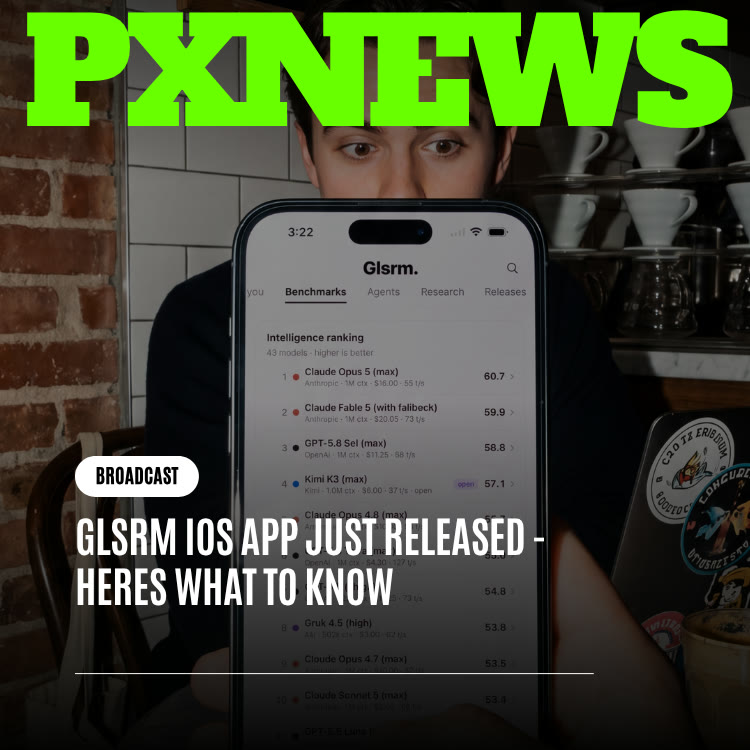
The GLSRM iOS app is out. Get the live AI newsfeed, Data Pulse, Releases, Benchmarks, Watch, and Circuits on iPhone, plus push alerts for what you follow.
GLSRM, ETAPX's live hub for AI industry news, now has a native iPhone app available on the App Store. It brings every part of the web product, from the newsfeed and Data Pulse to Watch, Circuits, Benchmarks, and Releases, to iOS and adds the one thing a browser tab could never do well: push notifications the moment something you follow changes. Here is what is in the app, how it relates to the website, and how to set it up so it helps rather than nags.
GLSRM in Brief: The Front Page of AI
If you have not used GLSRM before, think of it as a single place to understand what is happening across artificial intelligence right now. Instead of hopping between lab blogs, leaderboard sites, video channels, and forum threads, you get a continuously updating feed of industry news alongside tools for tracking models, comparing benchmark results, and discussing developments with other people who follow the space closely.
Until this release, all of that lived in a browser. GLSRM was built web-first and stayed web-only from launch, which suited long reading sessions at a desk. The iOS app is the first time GLSRM has existed as an installed app, and the first version able to contact you on its own.
Why AI News Needs a Phone App, Not Just a Website
The AI industry keeps irregular hours. A lab can publish a model before most of its home time zone is awake. Leaderboard rankings can shift in the middle of a workday. A heated discussion about a new release can peak while you are in a meeting, on a train, or picking up groceries. None of that lines up with when you happen to be sitting at a laptop with the right tab open.
A website is fundamentally passive. It holds information until you remember to look. That works for reference material, but it is a poor fit for a product whose whole value is helping you stay current. If you only learn about a major release hours later from a group chat, the live feed did not really serve you, no matter how quickly it was updated.
A phone app with notifications flips that relationship. You choose what matters to you, and GLSRM taps you on the shoulder when it moves. Constantly refreshing a news site stops being necessary; the app does the remembering and you get on with your day the rest of the time.
It is worth being clear about what did not change. Behind the scenes, the coverage engine and data sources are unchanged. The coverage, the feed, and the community are the same. The difference is the delivery: a home-screen icon and alerts.
Everything Included in the GLSRM iOS App
The iPhone app is not a trimmed-down companion to the website. Every section from the web version is present, reworked for one-handed use and quick glances.
- Live newsfeed: The always-updating core of GLSRM, reachable straight from your home screen.
- Data Pulse: GLSRM's quick-read industry statistics, laid out so you can scan the key figures while waiting in line.
- Releases: Event-style coverage of significant model and product launches, designed so a big launch feels like news rather than one more headline.
- Benchmarks: GLSRM's tracked leaderboards for AI models, easy to pull up when a conversation turns to which model leads on a particular task.
- Watch: GLSRM's video coverage, ready to play whenever you have a spare minute.
- Circuits: GLSRM's community spaces for discussion, reactions, and context around what is moving in AI.
- Push notifications: Follow models, labs, topics, or Circuits, and get alerted when something changes.
- A single synced account: Log in using your current ETAPX credentials from GLSRM's website. Your follows, bookmarks, and history move with you between them.
The release is free to download.
How the iPhone App and the Website Work Together
The website is not going away, and it is not being neglected. For deep reading, side-by-side comparison, and long research sessions, a large screen is still the better tool. The app has another purpose: fast look-ins and instant alerts during the parts of the day when you are away from a desk.
A useful way to think about it is catch-up versus right-now. A site is somewhere you go later to review the past. A phone app with alerts can reach you as it happens. GLSRM was designed as a live service, yet it spent its early life in the format worst suited to live delivery.
Because both run on one account, switching is seamless. Skim a Releases alert on your phone in the morning, then open the full write-up and benchmark comparison on your laptop that afternoon. Your follows, saved items, and reading history sync between the two, so nothing is lost when you change devices.
A website waits for you to remember it. An app with the right alerts remembers for you.
How to Set Up the GLSRM iOS App in Ten Minutes
Every section works the moment you sign in, with nothing to configure. The feature that changes your day, though, is notifications, and those are only as good as the choices you make at the start. Here is a sensible first-day setup:
- Install and sign in: Download GLSRM from the App Store on your iPhone and sign in with your existing ETAPX account. If you have used GLSRM on the web, your follows appear automatically.
- Trim your follow list: Before you turn on alerts, review what you follow. Keep only the labs, models, and subjects you actively watch and drop the ones you added out of passing curiosity.
- Start with two alert types: Turn on notifications for Releases and Benchmarks tied to what you follow, and leave the rest off for now.
- Live with it for a couple of days: Notice which alerts you acted on and which you swiped away. Adjust accordingly.
- Add Circuits gradually: Once you know which communities produce the discussion you value, enable alerts for those Circuits only.
- Put the app where your thumb goes: Place GLSRM on your first home screen page if you plan to check it during short breaks.
- Use the website for depth: When an alert deserves a closer look, save it and pick it up on the web later.
Why Restraint With Notifications Pays Off
Enabling every alert type on day one feels thorough, but it usually backfires. A phone that buzzes constantly trains you to ignore it, and then the one alert that mattered gets lost in the noise. Two people with different interests, say a frontier-model watcher and an open-source tooling fan, should end up with very different notification patterns. The settings offer enough detail for each person to strike their own balance.
Using GLSRM in the Small Moments of Your Day
The iPhone app is not trying to replace a focused hour of reading. It is built for the gaps: a few minutes before a call, a coffee line, a commute. A few patterns work well:
- Morning scan: Open the newsfeed and Data Pulse for a quick read on what happened overnight, especially if you follow labs in other time zones.
- Settle a debate: When a colleague insists one model is ahead, pull up Benchmarks instead of guessing.
- React in context: When a Releases alert lands, check the related Circuit to see early impressions and disagreements a headline will never capture.
- Queue a short video: Use Watch when you have a minute or two. A clip that is ready to play is far more likely to get watched than a video you plan to come back to later.
Circuits in particular reads differently on a phone. Dropping into a discussion for two minutes between tasks feels natural on mobile whereas booting up a computer for one thread feels like a chore.
A Simple Weekly Routine
Once a week, spend five minutes reviewing your GLSRM setup on your phone. Unfollow anything that has stopped being relevant, add any new labs or models that entered your work, and look at which Circuits you actually opened. Small, regular adjustments keep alerts useful instead of letting them drift into background noise.
Who Benefits Most From GLSRM on iPhone
Anyone curious about AI can use GLSRM, but a few groups will feel the difference of a mobile app with alerts most sharply.
People Who Work Away From a Desk
If your job keeps you on your feet, in meetings, or on the road, you have probably accepted learning about major AI news hours after everyone else. A phone alert closes that gap without asking you to change how you work.
Builders Choosing Between Models
Developers and product teams often need to know quickly when a model they rely on is updated or overtaken on a leaderboard. Following those specific models and turning on Benchmarks alerts turns a manual chore into an automatic heads-up.
Students and Newcomers to AI
The field moves fast enough to feel overwhelming. Following a handful of labs and topics, and reading the related Circuits discussion when something launches, is a manageable way to build understanding a little at a time.
Writers, Educators, and Creators
Anyone who explains AI to an audience benefits from hearing about developments early and from being able to check claims against Benchmarks and Releases before repeating them.
GLSRM on iOS Compared With Influxx's Native Apps
Earlier this year, Influxx, ETAPX's agentic environment, gained native apps on macOS and iOS. The two releases share a milestone but solve different problems.
- Influxx's native apps: Keep agentic work you have handed off running and let it reach you when it needs your input, even when no browser window is running.
- GLSRM's iOS app: Keep you current on an industry that never pauses, alerting you when something you follow changes.
Both reflect a shared belief: software that needs to reach you promptly cannot live only in a browser. If you are curious about Influxx, Agentic Engineering Just Became More Accessible to People New to AI on Influxx explains how it now works for beginners, and Why ETAPX Leans to iOS and macOS for Our Releases covers the company's platform choices.
What the GLSRM App Means for Whistlr Creators and Businesses
GLSRM and Whistlr are separate ETAPX products, and nothing about this release connects them directly. But if you create content or run a business on Whistlr and your niche touches technology, staying current on AI is part of the job, and a phone app with alerts makes that easier.
- Be early, not late: Creators who explain a major release while people are still curious tend to get more attention than those who summarize it days later. An alert on your phone can be the difference.
- Turn news into short video: A quick explainer on Minis, filmed with the Teleprompter for a clean delivery, is a natural format for breaking down what a new model does and does not do.
- Go live when it matters: A big launch is a good moment for a live stream where you react, answer questions with the Questions feature, and bring in a co-host who knows the subject.
- Check facts before you post: Use Benchmarks and Releases to confirm claims instead of repeating rumors. Accuracy builds trust with your peers faster than speed alone.
- Plan, do not just react: Business accounts can use the Business Suite planning calendar to map content around expected industry events, so coverage is ready when news breaks.
What Comes Next for GLSRM on Mobile
Think of this release as version one of GLSRM on mobile. The near-term focus is tightening what is already there: finer notification controls so you can decide exactly what reaches your phone and when, more personalized newsfeed ranking based on what you follow and read, and more work so leaderboards and launch coverage feel just as quick on a phone as on a monitor.
An Android version is not part of this announcement. ETAPX chose to get iOS right before splitting effort across platforms, and has said it will share plans for other platforms when there is something concrete to announce. You can follow ETAPX product news on PX Campus.
Frequently Asked Questions
Is there a GLSRM app for iPhone?
Yes. GLSRM's native iOS app is available on the App Store and is free to download. It is the first time GLSRM has been available as an installed app; before this release it was web-only.
What features are in the GLSRM iOS app?
The app includes the full web experience: the live AI newsfeed and Data Pulse statistics, plus Releases, Benchmarks, Watch, and Circuits. It also adds push notifications for the models, labs, topics, and Circuits you follow.
Do I need a separate account for the GLSRM app?
No. Your existing ETAPX login for GLSRM on the web works in the app too. Your follows, saved items, and reading history sync between the app and the website automatically.
Will the GLSRM website keep working?
Yes. The website is still the place for longer reading and research on a larger screen. The iOS app is designed for quick checks and real-time alerts, and using both side by side is the intended setup.
Is GLSRM available on Android?
Not at this time. ETAPX prioritized a polished iPhone release and has made no Android announcement. Any plans for additional platforms will be shared once they are concrete.
How do I avoid getting too many notifications from GLSRM?
Start small. Enable alerts only for Releases and Benchmarks tied to what you follow, use the app for a couple of days, then add specific Circuits once you know which ones are worth a real-time nudge. You can keep refining the settings as your interests shift.
GLSRM always promised to keep you current on AI. With an app on your iPhone and alerts tuned to what you care about, it can finally deliver that promise in the moment instead of after the fact. Download it, pick your follows carefully, and let the news find you.